Give the gift small icon
Give the gift of Artifcts!
HELLO!
Give the gift big icon
Give the gift
of Artifcts

The perfect gift for the person
in your life who has everything.

Give a gift Close

A New Family Tradition for the Holidays that Won't Cost a Dime

November 12, 2025

Who doesn’t love the board games, flag football, and annual viewing of movie favorites like Miracle on 34th Street, The Grinch, and Home Alone over the holidays with your family?

Get ready to make some new traditions, have fun with your family, and avoid awkward conversations like, “Have you seen Aunt Dot's new hairstyle?” Instead, you'll get to enjoy more of those, “I never knew that about you!” moments! We’re putting a spin on those traditions of togetherness with Artifcts, to help you AND your family save and share the memories and laugh-out-loud stories from holidays past and present. 

New Family Memories and Traditions with Artifcts 

We asked some of our most avid Artifcters, “How do you Artifct with family” and distilled the rather humorous stories we heard into a step-by-step process anyone can do whether you're hosting your crew this holiday season, or traveling across country (or next door!). Bonus, not only can these steps be used during your next holiday gathering, they also work great for you next family reunion too. 

#1. CREATE YOUR FREE ARTIFCTS MEMBERSHIP

If you're going to use Artifcts to preserve and share the memories and stories, you're going to need an account. Sign up free in 30 seconds, start to finish. Already have an account? Fabulous! You can skip to step #2.

#2. DECIDE ON A THEME

Give your family a focus for all those stories and memories. Here are some ideas to get you started, but we also offer free checklists to inspire you. Some families even send a link to the checklist/theme they choose ahead of the family gathering!

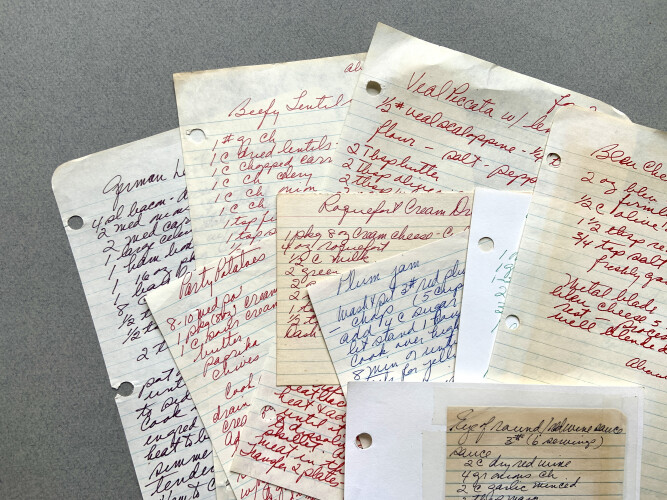
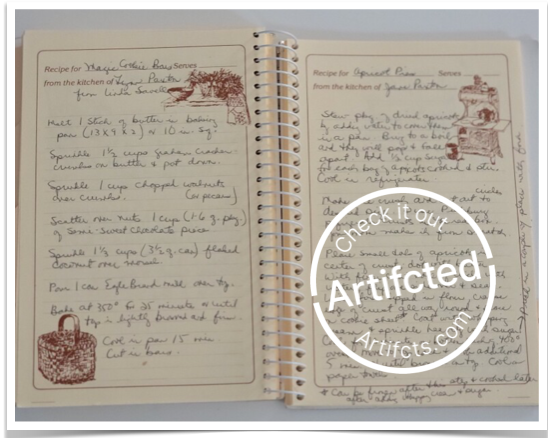
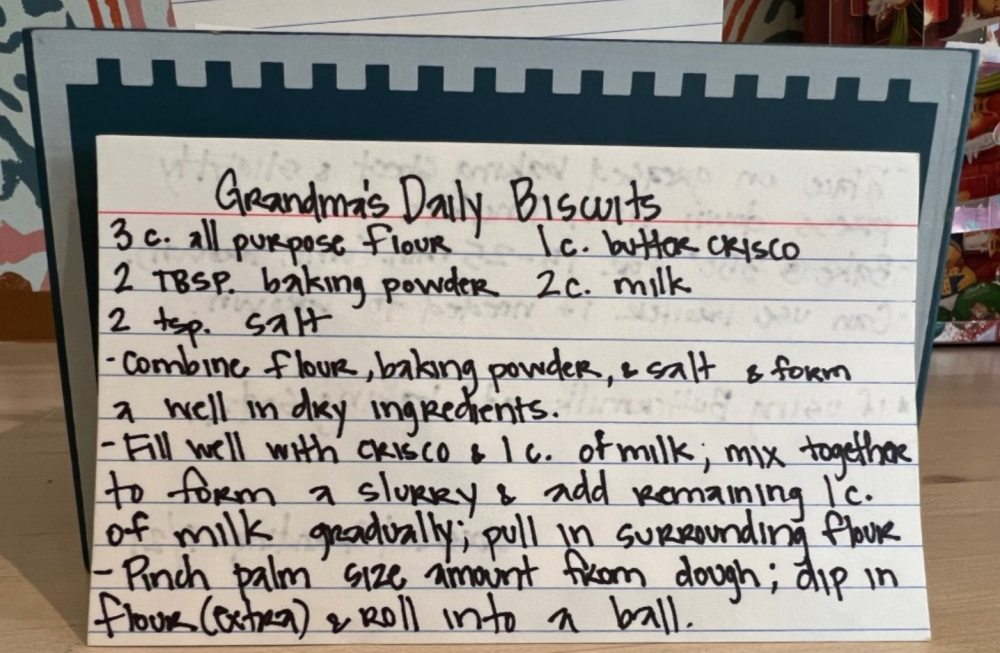
  • Recipes. Request modern family favorites to expand your repertoire. Or stick to oldies but goodies that have been passed down through the years. Make sure you include those "secret" ingredients too. 
  • Photos. “Oldest” and “funniest” competitions could be fun. One person told us last year they used, “Rarely do you see so many of us together,” types of photos and it was a blast. So many long-forgotten photos, and so many family members. Go for it! 
  • Family treasures. Maybe they’re family heirlooms or sentimental pieces created by your kids. Maybe they're mementos purchased while traveling and make for a good story. One family told their loved ones to each bring a cherished item to be Artifcted after Thanksgiving dinner. The result? A virtual timecapsule to be enjoyed for years to come!  
  • Going, going, gone. This one made us laugh and came from a reader after our recent “Epilogue: Family Keepers” story. The idea here is that if you are holding on to family heirlooms, antiques, or similar items, and you don’t really WANT to hold on to them, Artifct them to let others know so they have a final chance to call “Dibs!” 
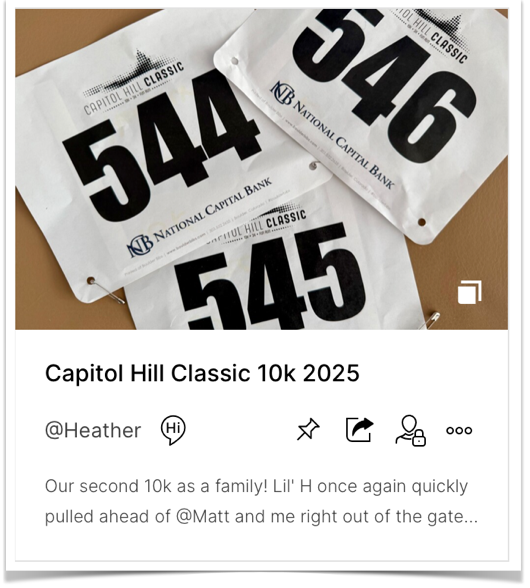
  • All things sports. This final example was from a family of running enthusiasts. Maybe your family is made up of musicians, artists, or travelers; same idea applies. This family Artifcted photos, running bibs, and race medals from the year, including videos of each of them crossing the finish lines. Personal best in a 5k? Awesome! 


Running bibs from 2025Keep the memories, but maybe not every last running bib from the past year. 
#3 ADD FAMILY MEMBERS TO YOUR ARTIFCTS "NETWORK"

(This step is optional, feel free to skip to step #4)

You need only each person's name and email. You can make it easier by filling in this template and then returning to your Account Settings > Content & Network > Network and clicking “Import” to add them all at once.

Don't have their email addresses? Text, call, or post a message wherever you and your family communicate to ask them to create an account on Artifcts.com and then send you their screen name. You can easily add them that way too.

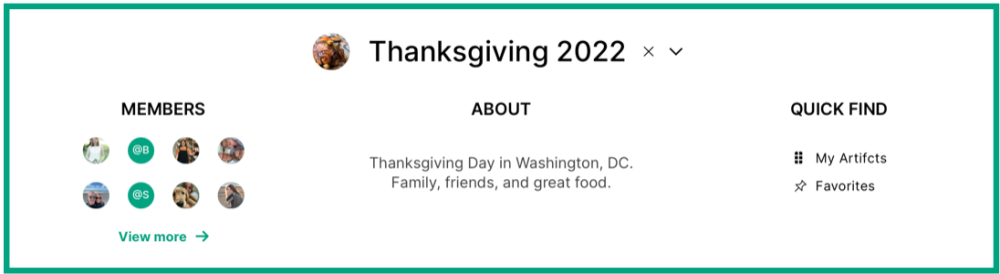
#4 CREATE AN INVITE-ONLY ARTIFCTS CIRCLE

Create an Artifcts Circle (we have a help video, too!) to easily unite and organize all the Artifcts your family creates and shares. Add each family member to it by: (a) selecting from your list if you completed step #3, (b) typing in their email address directly, or (c) emailing or texting them a link from your circle - they will have a week to accept the invite and you can always send a new link if needed.

      • You can choose, per person, to let them invite others or to make another person an “admin” who can add AND delete others. 
      • In the “About” section, describe for your family what this circle is for, e.g., “Let’s gather up and share favorite recipes for the holidays.”  
      • Then click to invite them and leave a comment, e.g.:

“Please create a free Artifcts account so we can swap recipes this year and not lose them in email or texts! Tag them #Thanksgiving2025. Bonus points if you add a funny short video snippet or audio file! Don’t forget to click share and choose this Circle or we can't see it. Call me if you need help.” 

You can always edit the Circle details, image for the Circle, and members, so don’t worry if you forget something (or someone) or have a change of plans.


Artifcts Circle exampleOur Co-Founder Heather's Artifcts Circle from Thanksgiving 2022. 

#5. CREATE YOUR ARTIFCTS & PICK YOUR MOMENT

When will you set aside time to share and reminisce about all your new Artifcts from your family? Maybe as the dinner is cooking or perhaps after dessert, you each take a couple of minutes and share the Artifcts you created and added to the Circle. You may discover new details, photos, and related stories you’ve never heard before!

Best yet, once your family starts Artifcting and sharing with your new Circle, they can contribute all year long! Next year you can pick right back up or choose a new theme to capture your family's history.

Togetherness and Remembrance this Holiday Season 

We want to acknowledge and talk about another facet of the holidays: grief.  

We know that the holidays can be an incredibly challenging time for many of us. We’re facing them with loved ones missing for the first time or perhaps facing the end soon. Artifcts can be a powerful way to spend time together capturing memories and stories for now and later, for you and for all your loved ones. It can also make it easier to decide what becomes of all the keepsakes that we ultimately leave behind one day.  

Our free Life Preparedness and After-Loss Support Guide may offer a helpful starting point. You may also find inspiration in some of our past ARTIcles by Artifcts such as Gift Your Loved Ones a Why and The Three Things I Wish My Mother Had Artifcted.  

Consider taking the time to watch the recording from our panel discussion about new traditions for the holidays as we process our grief. Our guests, Rachel Donnelly, founder of My AfterLight and Professionals of After Loss Services, and Garrick Colwell, of Kitchen Table Conversations, brought diverse and deep backgrounds to the practical and emotional aspects of grief. 

###

© 2025 Artifcts, Inc. All Rights Reserved.

Share With Friends
7 likes
What's New at Artifcts
The Devices We Overlook: A Practical Guide to Protecting Personal Data During a Move

When you're helping someone move, downsize, transition to senior living, or clear a home after a death, you naturally think about protecting their belongings. But what about the things that don't look like they contain anything valuable? 

An old phone in a bedside drawer. A laptop that hasn't been turned on in years. A printer in the home office. A USB drive in a junk drawer. A smart TV. A Wi-Fi router. Even the car. 

These objects may look like electronics headed for donation, recycling, or the trash. But they can also contain something far more sensitive than the device itself: a person's private information. 

For move managers and anyone helping clients or loved ones sort through a home, that creates an important duty of care. 

A Hard Drive is a Filing Cabinet That Doesn't Look Like One 

You wouldn't put a box of bank statements at the curb without thinking about what could happen to the information inside. A hard drive deserves the same consideration. 

The same is true of a phone, tablet, memory card, USB drive, or computer. Depending on the device and its age, it may contain: 

  • Bank and financial information
  • Tax records
  • Social Security numbers and other identifying information
  • Medical records
  • Personal photographs and videos
  • Email
  • Saved passwords and account credentials
  • Contacts and addresses
  • Access to subscriptions and other paid services 

And email deserves special attention. A logged-in email account can potentially be used to reset passwords for many other accounts, making an old laptop or phone much more than a collection of files. 

My rule of thumb? If it turns on, connects, or remembers, treat it like it holds private information. That simple rule catches many of the devices that are easy to overlook. 

If it turns on, connects, or remembers, treat it like it holds private information

It's Not Just Computers and Phones 

The obvious devices are easy to spot: computers and laptops; phones and tablets; external hard drives; and USB sticks and memory cards. 

But data can hide in less obvious places, too. Printers and copiers can retain copies of documents that have been scanned, printed, or faxed. Smart TVs and speakers may be connected to accounts and Wi-Fi networks. Gaming devices may contain account credentials and payment information. Routers and smart-home devices can contain network information or remain connected to online services. 

And let’s not forget what’s in the garage! Cars may store contacts, addresses, garage codes, messages, navigation history, and other personal information. 

And then there are the devices sitting quietly in drawers: an old phone that no longer works, a tablet that hasn't been charged in years, or a stack of memory cards whose contents nobody remembers. The fact that a device is old, broken, or forgotten doesn't mean its data is gone. 

"But They Already Erased It." 

This is where assumptions can get dangerous. 

A 2014 Avast study famously found that researchers were able to recover more than 40,000 photos, texts, emails, and personal records from 20 used phones that their previous owners believed they had erased. Avast repeated the exercise in 2016, finding data remaining on 12 of 20 phones purchased from pawn shops. 

Those examples are dated, and the technology has changed. Modern iOS and Android devices generally use encryption and have improved reset processes that help protect data when a device is reset, but older devices remain in homes. So do broken devices, old hard drives, USB drives, memory cards, and computers that may not have had encryption enabled. 

That's why "delete" and "erase" should not automatically be treated as the same thing. 

If you cannot confidently establish that the information has been securely removed, secure destruction may be the safer path. 

Three Questions to Ask About Every Device 

Rather than trying to become a technology expert overnight, use a simple repeatable process. 

  1. What's on it?

Think about the sensitivity of the information the device might contain. Could it have financial information? Medical records? Identity documents? Passwords? Family photographs? Email? 

  1. Who decides?

This question is especially important during a move. The person who physically hands you a device isn't necessarily the person legally authorized to decide what happens to it. 

For a typical downsizing move, the client or loved one may make the decision. For an estate clear-out, the executor—not simply whichever family member happens to be present—may have authority. And after a death, family members may need time to determine what photographs, files, accounts, or other information should be preserved before anything is erased. 

  1. What's the right call?

Once you know what's on the device and who has authority to decide, determine what should happen next. 

Transfer. Erase. Destroy. Donate. Recycle. 

When I'm helping loved ones through this process, these are the five steps I am most focused on.   

  1. Transfer

The device—or simply the files on it—stays with the client or family. Before transferring it, ask whether there is anything on the device that shouldn't be passed along. 

  1. Erase

If the device is leaving the client's or your loved one's possession, securely erase the information first. A quick "delete" isn't necessarily enough. And if you can't confirm that the erasure worked, don't assume it did. 

  1. Destroy

When you can't confidently erase a device, secure destruction is an option. For particularly sensitive devices or situations where the data cannot be reliably removed, shredding can provide a clear endpoint. When using a destruction service, obtain documentation or a certificate of destruction. 

  1. Donate

Donation can give a usable device a second life—but only after the information has been securely erased. 

  1. Recycle

Recycling handles the physical materials. It does not automatically erase the information stored on the device. That's an important distinction. Recycling isn't erasing. 

Don't Just Throw It Away 

The easiest choice isn't always the most defensible one. If a device contains personal information, putting it into a regular trash or donation stream without first addressing the data creates an unnecessary risk. 

Instead, identify trusted resources before you need them. 

Check local directories for secure shredding and electronics recycling and maybe even ask banks, hospitals, law offices, and fellow NASMM members which providers they trust, depending on the device. 

Make Data Security Part of Your Pre-Move Walk-Through 

One of the easiest ways to improve the moving and/or downsizing process is to build a data sweep into the normal home walk-through. As you move room by room, look for anything that: turns on, connects, or remembers. 

Check home offices, kitchen drawers, bedside tables, living rooms, entertainment centers, garages, closets, and cars. 

Set potentially sensitive devices aside in a secure location rather than putting them into the general sorting pile. 

And don’t forget to document the decision! Good documentation turns a judgment call into a defensible process. 

For each device, record: 

  • What the item is
  • What decision was made
  • Who approved the decision
  • The date
  • Who handled it
  • Where it went
  • Any destruction or recycling documentation received 

That paper trail protects both the client and the professionals handling the move. 

How to Talk About It With Clients or Loved Ones

Data security can sound intimidating. It doesn't have to. 

Instead of making the conversation about technology, make it about protecting the client's belongings. 

For example: 

"As we sort, I'll set aside anything that might hold personal information—old computers, phones, even printers—and handle it as carefully as your financial papers. Nothing leaves unchecked." 

If someone says, "Just throw it out," you can explain: 

"I don't just toss it because it can hold the same information a thief would need. Doing it right protects you and your family." 

And when the client or your loved one is overwhelmed, focus on the reassuring part: 

"We keep what matters—your photos and important files—and safely close out the rest." 

That's an important shift. For move managers, data security doesn't have to feel like another problem you're putting on the client. It can be part of the service you're providing. 

A Simple Protocol You Can Use on Every Move 

When you encounter a device, ask: 

  • What's on it?
  • How sensitive could the information be?
  • Who gets to decide? 

Is it the client, a power of attorney, an executor, or someone else with authority? 

What's the right call? Transfer it? Erase it? Destroy it? Donate it? Recycle it? 

Then document the decision and the outcome. 

It's simple enough to become routine—and comprehensive enough to create a consistent process across jobs. 

The Bigger Picture: Preserving What Matters 

Move management is ultimately about transitions. Sometimes that means helping someone preserve the photographs, documents, memories, and belongings that matter most. It also means knowing when something should not continue into the next chapter. 

An old laptop may look like junk. A phone may look worthless. A USB drive may look like a piece of plastic. But each may be a container for a client's identity, memories, finances, relationships, and access to their digital life. 

Preserve what matters. Secure the rest. 

###

© 2026 Artifcts, Inc. All Rights Reserved.

Read more
Decluttering for Dementia

If you’ve ever needed a better reason to stick to or create a resolution to declutter your home, this one might do it: It’s good for your brain. And we’ve seen it firsthand.  

In today’s piece, we talk openly about facing a loved one’s dementia diagnosis, and how, maybe to your surprise, decluttering can help. We are grateful to include specialist insights throughout from Cathy Rice, certified senior move manager and life-long educator.  

________________

Dementia is heartbreaking, terrifying, and, so far, irreversible. Even if a loved one is in many ways themself, we know the disease is slowly changing them and shortening their life. 

Some of us react to this sort of diagnosis with a desire to do something, anything, to help, to make our loved one’s life in any way better, to take the tiniest measure of control over the disease. We dive into a multi-prong tactical to-do list that we must continuously update as together we progress from diagnosis, to sharing that diagnosis with others, to learning how to manage the disease and being as prepared as possible across legal, medical, financial, and insurance fronts.  

As we seek out ou own ways to help, we expect to find information about diet, exercise, and social activities, and we do. What we were surprised to find recently while browsing HFC, Shining a Light on Alzheimer's: 5 Brain Health Habits was the hot mainstream topic of decluttering.  

Benefits of Decluttering for Those With Dementia 

You know decluttering well from TV shows like The Gentle Art of Swedish Death Cleaning and The Home Edit, and books including Matt Paxton’s famous Keep The Memories, Lose The Stuff. Decluttering to support someone with dementia in some ways is like decluttering for people with normal brain health. Too much stuff can literally be dangerous if we cannot safely navigate our homes. Some of us are also more sensitive to feeling drained by too much stuff lying about around us.  

Of course, when you have dementia, decluttering has other benefits, too. 

      • Reduce stress. Stress reduction is imperative when you have mild cognitive impairment or dementia. And decluttering can mean clearing away some of the to-dos that come to mind when people see stuff to tidy, dust, or keep safe. Have you experienced a loved one with dementia hiding things to keep the item safe? I am sure you have because it's an incredibly common behavior. 
      • Improve sleep. Quality sleep is critical for the brain’s nightly reset. Busy surroundings can lead to busy brains and may even sow confusion in bedtime routines.  
      • Safety, safety, safety. We know, decluttering is about aging well in place for all of us as we age, but it’s especially true for people with health conditions, like dementia, that can make them more vulnerable to confusing and distracting surroundings.
      • Avoiding anything close to hoarding. Keep in mind, hoarding disorder is its own condition, but managing even the clutter of daily life is more difficult when you have dementia because of increased challenges in making decisions.  
      • Purpose. We know finding purpose at any age is important. Here we are talking about giving the decluttering process a purpose to help your loved one part with more items than they might otherwise be willing to do. Purpose might be supporting a local shelter, resupplying charitable builders with tools, or reconnecting with loved ones when you pass down items. You get the idea. 

Decluttering for Dementia

We’ve prepared these tips from our own practical experience helping our loved ones with dementia as we try to help make sense of it all, including one’s surroundings.* In some cases our loved ones were also decluttering to downsize and move. In others, it was more of a practical decluttering, for safety and mental health.  

* We are not medical professionals. If you are considering radical changes to your loved one’s home enviornment, you should consult first with a specialist licensed in dementia care.

LIGHTS ...

Before you start your declutter, check the lighting throughout the home. Living like a cave troll generally does no one very good. But dementia is not only about memory. If you can see well what’s around you, it’s easier to make sense of your surroundings (and of course it’s safer). Make it easy to see the light switches, too. Understanding and interpreting surroundings, like a white switch on a white wall, can become an impediment for someone with dementia. 

Cathy’s Insight: Adding felt pads to any lighting fixture to differentiate the feel of the switch from the fixture itself or a simple icon as a visual cue helps to support the brain's understanding of the item with its function.

… CAMERA, ACTION!

Start from the ground, and work your way up.

What’s on the floor? Stacks of stuff? Wandering power cords? Rugs that slip and shift? Take a fresh look. Then move your eye upward to the surfaces of counters and entry tables. If someone needed to quickly grab onto a surface to prevent a fall, would they have a secure place to grab?  Is there a clear and secured place for common objects, like house keys?

Cathy’s Insight: People with dementia often find comfort in knowing that their stuff is close-at-hand. Create a "command center" within easy reach of their favorite chair for essentials (eyeglasses, books, pencils, fidget items, etc.).  

And about those rugs … if you must keep them, use carpet tape to secure edges to the floor. The same applies to small storage trays, which you can secure with surface-safe tape or museum putty.

Favor simple home furnishings.

As we know stress takes its own toll on the brain; let’s try to minimize the stress home décor can accidentally create. One Arti Member told us, “My loved one was disturbed by a decorative lumbar pillow that had a shaggy fur cover. It looked like a small dog.” Sometimes textures and patterns can be difficult for people with dementia to interpret. Likewise distinguishing whether an object is inanimate. This is why some people with advancing dementia find comfort with life-like pets such as those from Joy For All.

Take it down a notch.

This is about audio clutter. Too much and/or competing noises can be incredibly distracting for anyone, particularly someone with dementia. Think about simultaneous noise from the television, washing machine, and someone on a phone call, for example.

Cathy’s Insight: Taking this point a step further, family, friends, and caregivers should practice standing in front of, and at eye level if appropriate, people with dementia before speaking with them. Get their attention by saying their name and then speak simply and succinctly. 

Set it aside, together. Do not remove it. 

Don’t remove it immediately, if you do not have to, that is. Rushes to declutter in support of someone with memory loss could lead to irreversible loss of cherished mementos that also can serve as visual cues for familiarity and comfort. Is there an alternative way to display the items that the person with dementia says they care most about? Maybe try grouping like items on a shelf or table where they will see them often. For photos, you might even consider a digital photo frame, such as those from Nixplay, Aura, or any of the many other options.  

For items that do not make the cut, if space permits, store them in an appropriate box, and set them aside so you can pull them back out later if needed or as part of a monthly or maybe seasonal rotation. We recommend you Artifct them before they go into the box and tag them to easily recall what you've stored. This approach does not apply to duplicates, meaningless bits and bops, or trash. Consult with your loved one always as well as your own good judgement.

Clarity of Purpose for the Win

Our final decluttering tip is about visual chaos. If you open a drawer and see a jumble of socks, pants, and t-shirts, you could get distracted or confused. If a cabinet has five options for plates, and 10 options for cups, which should you choose? Not only should you streamline what’s inside for simpler decision making but consider visually labeling doors to indicate what’s inside. This gadget could help you get started with easy printing of images from your phone.

Cathy’s Insight: As the disease of dementia progresses, consider only placing the clothes needed for that day in the drawer or use a shelf in a bedroom/bathroom as the place for their daily wardrobe.  

Do you have decluttering tips for dementia? We’d love to hear them! You can contact Editor@Artifcts.com.

Happy Artifcting!

_________________

ADDITIONAL REFERENCES

If you are a caregiver or supporting someone who is, you may find it helpful to browse and share these related resources.

Alzheimer's Society, UK: 10 Ways to Make Your Home Dementia Friendly 

US National Institute of Health: Study of Home Modifications for People with Dementia 

Wisconsin Alzheimer's Institute: Communication Strategies in Dementia Care  

Mayo Clinic: Clearing Clutter Benefits Your Health and Well-Being

Psychology Today: The Many Mental Benefits of Decluttering 

AARP Michigan: Dementia Resource Guide for Families

###

© 2026 Artifcts, Inc. All Rights Reserved.
Read more
Thousands of Photos, One Story: How to Make Your Kids’ Sports Photos Matter

September is Save Your Photos Month, and here at Artifcts our team has been struggling with one of life's greatest challenges: what to do with the overwhelming number of digital photos we take, save, and then never revisit. Our CTO alone has over 44,000 photos on his phone. Yikes! 

Some of the biggest culprits? Travel photos, food photos (our older kids really do believe Instagram eats first!), pet photos, and kids photos. 

If you’re a parent with a phone, you probably have thousands of photos of your kids playing sports. Our co-founder Heather knows this firsthand. Her daughter ran cross country, which meant race after race, season after season, and thousands upon thousands of photos.  

The funny thing about photographing a cross-country race is that one photo can look an awful lot like the next. If you're lucky, you get a race bib to help you tell them apart, but that is only at the high school level. Otherwise there's woods, woods, and more woods, and if you're in the right spot at the right time, one or two really good photos of your child in the sea of other runners. 

Was that the race where she had an incredible finish? The one where she was struggling but pushed through? The one where her best friend ran beside her? Or just a random Saturday morning when everyone was cold and muddy? 

Years from now, Heather's daughter may look through those photos and have no idea. That’s the real challenge with digital photos. It’s not simply, "How do I store them?" It’s, "How do I preserve the moments that mattered, and the story behind them?" 

Our Simple Four-Step Approach

  1. Group by category

Start by getting the photos out of the digital mess (umm, we mean pile) that is your phone. Create a folder for the sport, season, team, trip, or event. For example: Soccer Fall 2025, or Basketball Middle School, or Championship Game. 

You don't have to organize every photo perfectly. Just create a meaningful folder or category so you can find the story again. 

  1. Cull the clutter

Now comes the hard part: delete! You don't need 47 nearly identical shots of your daughter coming around the same bend. (We speak from experience here!) Keep the best ones and let the rest go.  

Our friends at The Photo Managers have some good advice for us here: Delete theduplicates and near-duplicates, blurry photos, accidental shots, poor-quality images, and photos where someone is looking away. 

Your goal isn't to preserve everything. It's to preserve what you'll actually want to see, and what will help someone else understand the experience later. 

Your goal isn't to preserve everything. It's to preserve what you'll actually want to see...
  1. Artifctyour favorites 

This is where a photo becomes more than a photo. Pick the images that tell the story, and then Artifct them with the context you'll otherwise forget. 

For a cross-country race, that might be: 

"This was the race where she finally broke 22 minutes after working toward it all season." 

Or: 

"Cold, rainy morning. She didn't want to race. Her teammates convinced her to go—and she ended up finishing third." 

Or maybe it's simply: 

"Her last high school cross-country race." 

Add the date, place, people, photos, and story. If the story is easier to tell than type, capture it in your own voice, because someday, your daughter won't just want to know what she looked like running, she'll want to know why that race mattered. (And she may even love hearing it in your voice!) 

  1. Share with family and friends

Once you've done the work, don't let those photos disappear into your camera roll. 

Share the Artifct with grandparents, teammates, friends, coaches, or—most importantly—the athlete herself. Instead of sending 200 photos from the race, send the Artifct that tells the story. 

That's the difference between having photos and preserving a memory. The goal isn't thousands of perfect photos; rather, it's a handful of meaningful ones that still make sense years from now. 

So go ahead, find that folder of 5,000 cross-country photos. Group them. Cull them. Artifct the favorites. Share the stories. Your future self—and your kids—will be glad you did. 

Happy Artifcting! 


###

Looking for additional tips about Artifcting photos? Check out our How To Artifct That Photo article for inspiration.

© 2026 Artifcts, Inc. All Rights Reserved.
Read more
Your privacy

This website uses only essential cookies to provide reliable and secure services, streamline your experience, allow you to share content from this website on social media, and to analyze how our Site is used. Learn more about these cookies and cookie settings.

Accept & Continue
Oops! This Web Browser Version is Unsupported

You received this warning because you are using an unsupported browser. Some features of Artifcts will not be available or will be displayed improperly until you update to the latest version or change browsers.

Close
Image for unsupported banner Oops! This Web Browser is Unsupported

You received this warning because you are using an unsupported browser. Some features of Artifcts will not be available or will be displayed improperly until you update to the latest version or change browsers.

Unsupported banner close icon Close